
How it works
MMK is a powerful system, and fleets use it in different ways, so it helps to understand exactly what Floatist does with your data. This page explains where the information on a booking comes from and why a few things look the way they do.
For getting the integration connected and syncing boats, see the MMK setup guide.
Which way data flows
Section titled “Which way data flows”Floatist reads everything on your MMK calendar, and shows it to you. What Floatist then does with it is up to two automations you choose on the setup page:
- Create Floatist bookings (MMK → Floatist). Floatist turns your MMK reservations into Floatist bookings and keeps them in sync. This is the main flow.
- Block availability in MMK (Floatist → MMK, optional). Floatist puts an option in MMK for bookings that didn’t come from MMK, so the dates can’t be sold twice. This is also how the MMK & NauSYS bridge keeps the two systems aligned.
Whichever automations you run, you can always see what’s in MMK from the booking calendar.
Seeing MMK schedule in the booking calendar
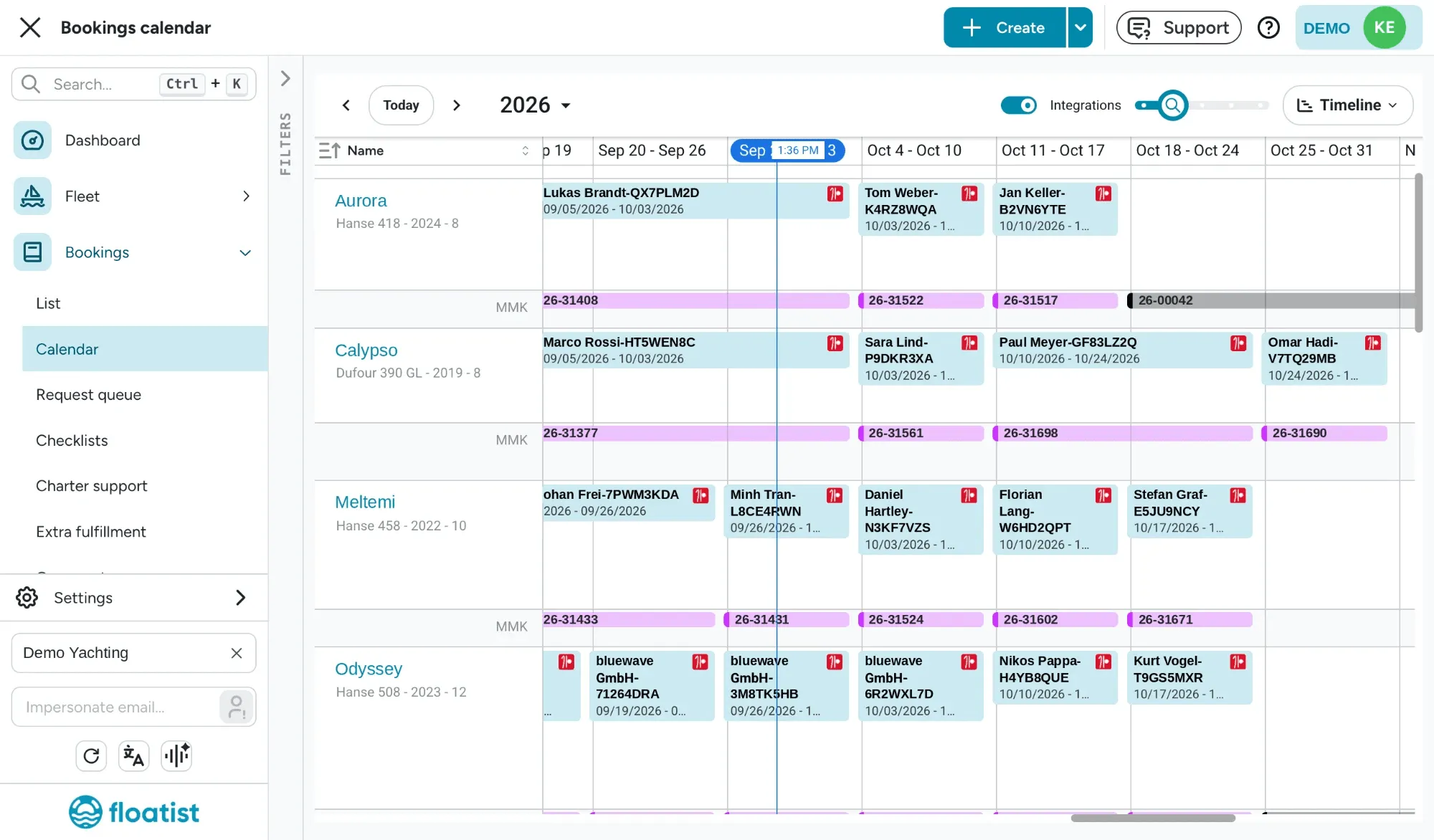
Section titled “Seeing MMK schedule in the booking calendar”Turn on Integrations in the header of Bookings > Calendar to see what’s on your MMK calendar alongside your Floatist bookings. Each boat that has something in MMK for the dates you’re looking at gets a row marked MMK directly under it, showing every MMK booking type in the same colours MMK uses. The switch appears once MMK is set up, and your choice is remembered in your browser.
| MMK booking type | Colour |
|---|---|
| Reservation | Purple |
| Option | Yellow |
| Option expired | Orange |
| Owner week | Green |
| Service | Grey, with a black edge |
| Regatta | Light blue |
| Sleep aboard | Dark red |
Each MMK bar has a light fill with a stronger edge in its colour, and shows the reservation code. Hover for the booking type, the guest name and the bases. Cancelled reservations and offers aren’t shown. MMK items are read-only: you can’t drag or edit them in Floatist.
The same MMK items also show up where you pick dates: in the booking form’s overlap check and on a booking request. That way you can see an MMK option or service on those dates before you confirm anything.
The MMK reservation drawer
Section titled “The MMK reservation drawer”Click any MMK item in the calendar to open the MMK reservation drawer. It holds everything MMK sends Floatist about the reservation:
- The reservation code, client price and deposit, plus the boat, dates, product, remarks, and when the reservation was created, confirmed or expires.
- Money: base price, discount, commission, final price, terms of payment and bank details.
- Extras: name, quantity, price and whether each is payable at base. These are MMK’s extras and are not synchronized with Floatist extras.
- Payment plan: each instalment’s amount and due date.
- Guest and Client cards (see Guest and client).
- Ids from MMK: the reservation, yacht, bases and client IDs, and whether each is linked to Floatist. If the yacht or a base isn’t linked, the drawer says so: the booking sync skips that reservation until it is.
- An Open in MMK button to jump straight to the reservation in MMK and make changes there.
This replaces the booking’s old Integration tab. On a synced booking, the sync panel has a Details button that opens the same drawer, and an Open in MMK button that takes you straight to the reservation in MMK.
Source icons
Section titled “Source icons”Where a booking came from is shown as a small icon: the Floatist logo, or the MMK, NauSYS or Tigerbay icon. You’ll see it on calendar bars and next to the boat name in the bookings list. Hover the icon for its name.
Which reservations become bookings
Section titled “Which reservations become bookings”- Statuses that become Floatist bookings: Reservation, Regatta, and Owner week. An owner week with no guest name shows as “Boat owner”.
- Other statuses (options, services, cancellations) don’t create a booking. You still see them in the calendar with Integrations on. If a reservation that already has a booking moves to one of these statuses, the booking is archived.
- Charters that have already ended aren’t rewritten by the sync.
- Financial details synced from MMK: the reservation code, price and currency, security deposit, the payment plan, and extras. They’re in the drawer and available to your contracts.
Guest and client
Section titled “Guest and client”An MMK reservation names two parties, and MMK’s own naming is famously confusing:
- The client is always a contact from your MMK address book.
- The guest is just a name, typed as free text on the reservation, with no email or phone.
Which is which depends on who made the booking:
- An agency booking. The agency creates an option on your boat, and when it’s confirmed, the client is the agency. The real guest isn’t in your address book, so at best the agency types their name in the guest field.
- A direct booking. Your team creates the reservation, and often picks the real guest as the client because they’re already in your address book.
So neither field reliably means “the person sailing”. Floatist doesn’t guess. You choose how the booking’s contact is picked with the Booking contact setting.
The drawer shows both: the Guest card with the name MMK sent and any possible matches, and the Client card with the contact from your directory.
Matching the guest to a contact
Section titled “Matching the guest to a contact”When the setting looks the guest up in your contacts, Floatist searches your Contacts for the typed name:
- If the typed name is the reservation’s own client, that client is used.
- Otherwise Floatist looks for contacts with the same name. Because address books often hold the same person several times, it prefers the one that has an email (so the boarding pass can go out), then one that has a phone, then the one with the most details filled in. If it’s still a tie, the oldest contact wins.
The Guest card in the drawer tells you how sure the match is. It says whether there’s no contact with that name, a possible match found by name only, or several possible matches with the same name.
Keeping a booking in sync
Section titled “Keeping a booking in sync”A booking created from MMK shows a sync panel on its details card: MMK on one side, Floatist on the other. The link between them has two switches:
- Sync booking keeps the boat, dates, start and end base, and archived state in line with MMK. While it’s on, those fields are locked in Floatist.
- Sync contact keeps the booking’s contact in line with MMK, based on your Booking contact setting. While it’s on, the Contact section is locked.
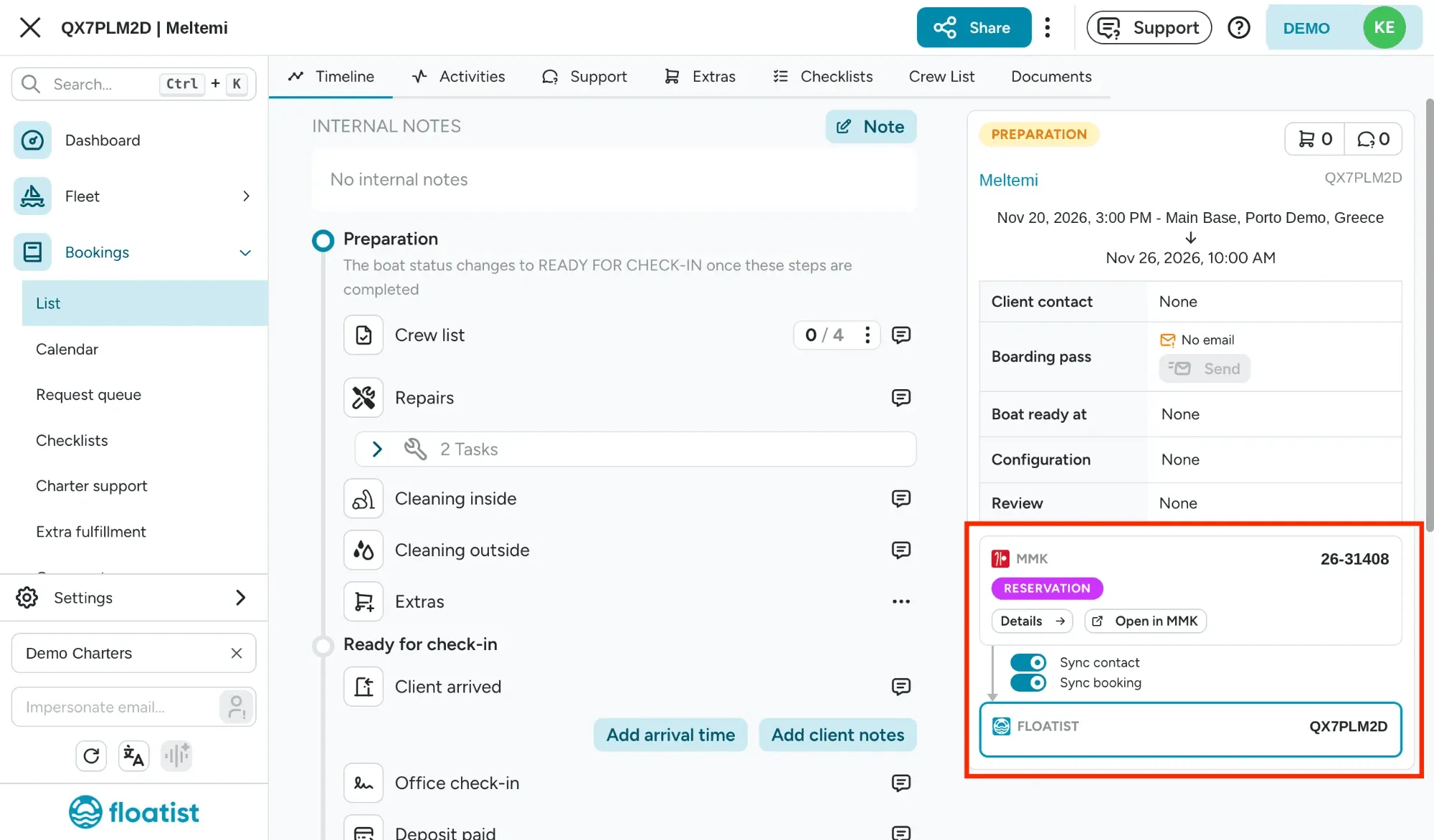
To change something MMK got wrong, switch the relevant part off and edit the booking. For example, turn off Sync contact to link a different contact or override the email for this booking. The rest keeps syncing.
Changed your mind? Switch it back on and the booking immediately takes MMK’s values again. For Sync contact, the contact is picked again according to your Booking contact setting, and any overrides you made on the booking are replaced. Every switch change is logged in the booking’s activity.
This replaces detaching a booking from MMK. You no longer have to cut a booking off entirely to fix one field.
When a booking and MMK don’t match
Section titled “When a booking and MMK don’t match”Floatist and MMK are two separate systems, and they can drift apart. You may have moved a booking with Sync booking off, or MMK may have changed something on its side. When the dates or the boat of a booking no longer match its MMK reservation:
- The MMK item in the calendar gets a red outline, and its tooltip says whether the dates differ or the booking is on another boat.
- In the booking’s sync panel, the value that doesn’t match is marked Does not match MMK.
- If the reservation is gone from MMK, the panel says so. It may have been cancelled or removed there.
To bring the booking back in line with MMK, switch Sync booking back on.
Archiving a synced booking
Section titled “Archiving a synced booking”Archiving or unarchiving a booking yourself switches Sync booking off, so the next sync doesn’t undo it. While Sync booking is on, Floatist archives the booking when the MMK reservation is no longer a reservation, and unarchives it if it becomes one again.
Bookings pushed to MMK appear as an “option”
Section titled “Bookings pushed to MMK appear as an “option””When Block availability in MMK is on and a booking is created outside MMK (in Floatist, on your marketing website, or in NauSYS), Floatist creates an option in MMK for those dates, booked under the contact you picked.
This is deliberate. Floatist needs to be able to release those dates if you later cancel the booking, and MMK only lets us cancel options, not confirmed reservations. If you cancel the booking in Floatist, we cancel the option and the dates free up again. If you confirm the option into a reservation in MMK yourself, Floatist leaves it alone from then on.
Sync frequency
Section titled “Sync frequency”MMK bookings now sync much faster, allowing your booking team to use the Floatist booking calendar as a source of truth across multiple platforms, as well as see Floatist bookings quicker in MMK.
Create Floatist bookings (MMK → Floatist)
Section titled “Create Floatist bookings (MMK → Floatist)”- Now to 4 months out: syncs every 15 minutes
- 5 to 12 months out: syncs every hour
- 13 to 24 months out: syncs every 6 hours
Block availability in MMK (Floatist → MMK)
Section titled “Block availability in MMK (Floatist → MMK)”This push runs on an hourly cadence. Floatist bookings are generated as an option in MMK, regenerating it if it falls out of sync.
Contacts
Section titled “Contacts”Your MMK address book syncs into Contacts every night.