
Shopping list
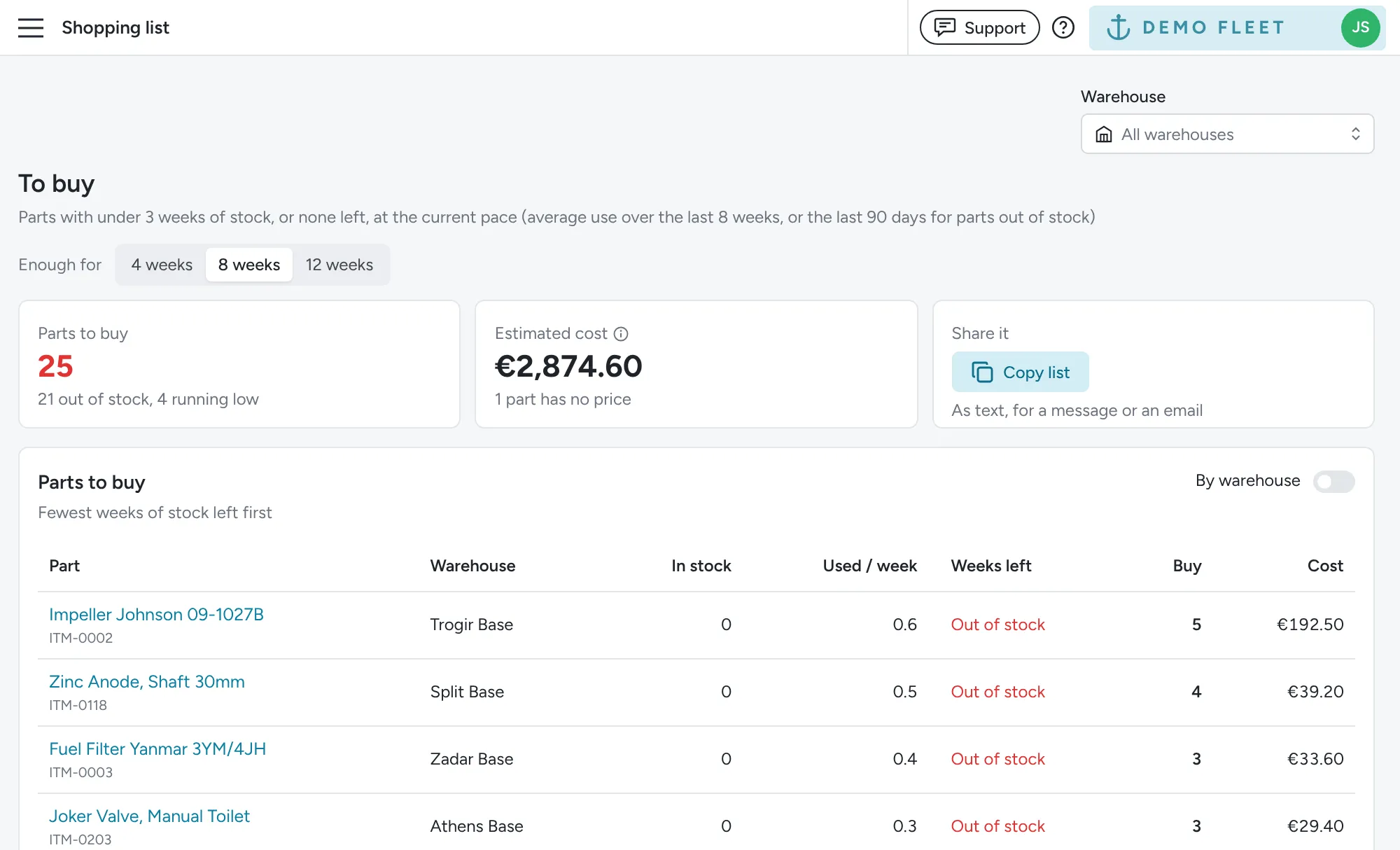
The Inventory > Shopping list page lists all stock that is running low or out of stock, and how many to buy. Use it before a supplier order, or ahead of turnaround day, so no boat leaves the base short of stock it needs.
- Use Enough for to choose how many weeks of stock to buy for: 4, 8 (the default) or 12 weeks. The Buy column tells you how many units that takes at the current pace.
- Items with the fewest weeks of stock left come first. Turn on By warehouse to group them by warehouse instead, each with its own subtotal, since that is where the order gets delivered.
- Estimated cost uses the price of each item’s newest batch. If some items have no price, it tells you how many.
- Click Copy list to copy the list as text, grouped by warehouse, ready to paste into a message or an email to your supplier.
- Use the Warehouse selector to see the list for one warehouse.
How running low is worked out
Section titled “How running low is worked out”Floatist doesn’t ask you to set a minimum stock level for each item. Instead, it looks at how much of the item you used on average over the last 8 weeks and works out how many weeks of stock you have left at that pace. An item counts as running low when less than 3 weeks are left, and out of stock when you’ve used it in the last 90 days and none is left. This adjusts on its own as the season speeds up or slows down.
When the delivery arrives, use Add stock on each item. See Adding stock and new prices.