Schedules
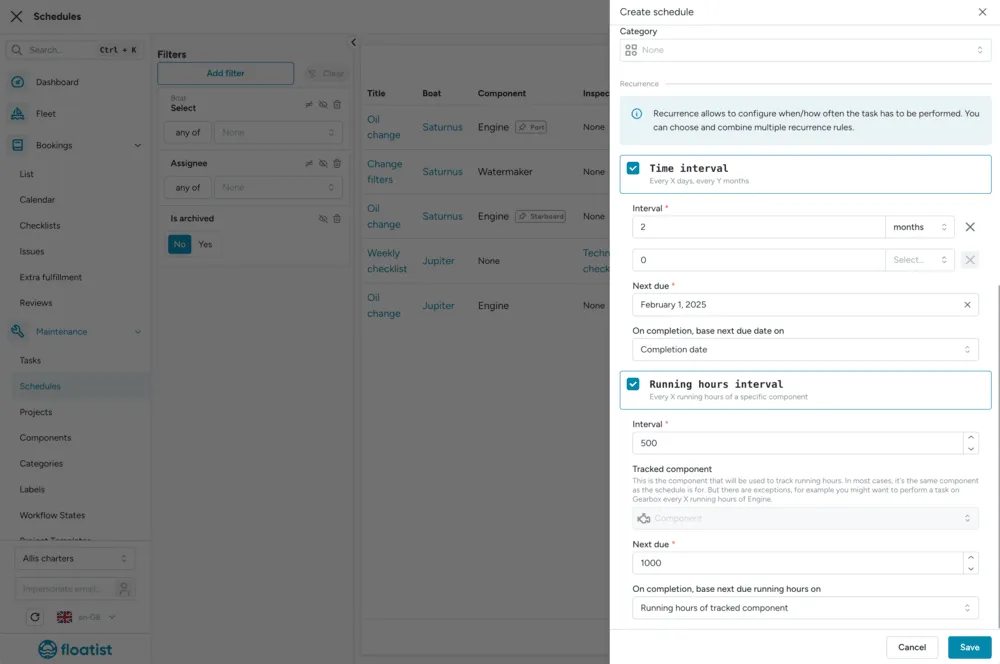
Preventive maintenance is all about periodically checking boat components on a regular basis. In Floatist, you can create schedules based on:
- Time
- Component hours
The schedule will then automatically create the next task that has to be done, at the appropriate time.
In order to create a scheduled task, go to Task management > Schedules > select Create if you want to create one schedule or select the arrow and Create in bulk if you want to create schedules in bulk.
Using the form, you can specify your schedule:
- Select an optional boat
- Add a title and optional description
- Select a workflow state, which will be the state in which the task will be created
- Add an optional checklist, assignees, labels and/or category
- Choose your recurrence: you can select either a Time interval or a Running hours interval, or both, and then it will be due on whichever occurrence is earlier
You always have to select a Next due and whether you want to base the next due date on the completion date, or the planned date after completing the previous task. If you want to keep a fixed schedule (e.g., every Monday) you should select planned date here, but if it’s flexible you can select to base the next one on the completion date, which means if you are late completing a task then the next date will be moved forward as well.