Warehouses
A warehouse is any place you keep stock: a base storeroom, a container on the quay or a workshop. Set up one or multiple warehouses, based on where you keep your stock. Every item belongs to a warehouse, so set up your warehouses before you add items.
Warehouses aren’t tied to bases. If a base has a storeroom and a container, make two warehouses. See How inventory works for how warehouses, items and FIDs fit together.
Creating a warehouse
Section titled “Creating a warehouse”Go to Inventory > Warehouses, click the Create button, specify the name, and click Confirm.
The warehouses list
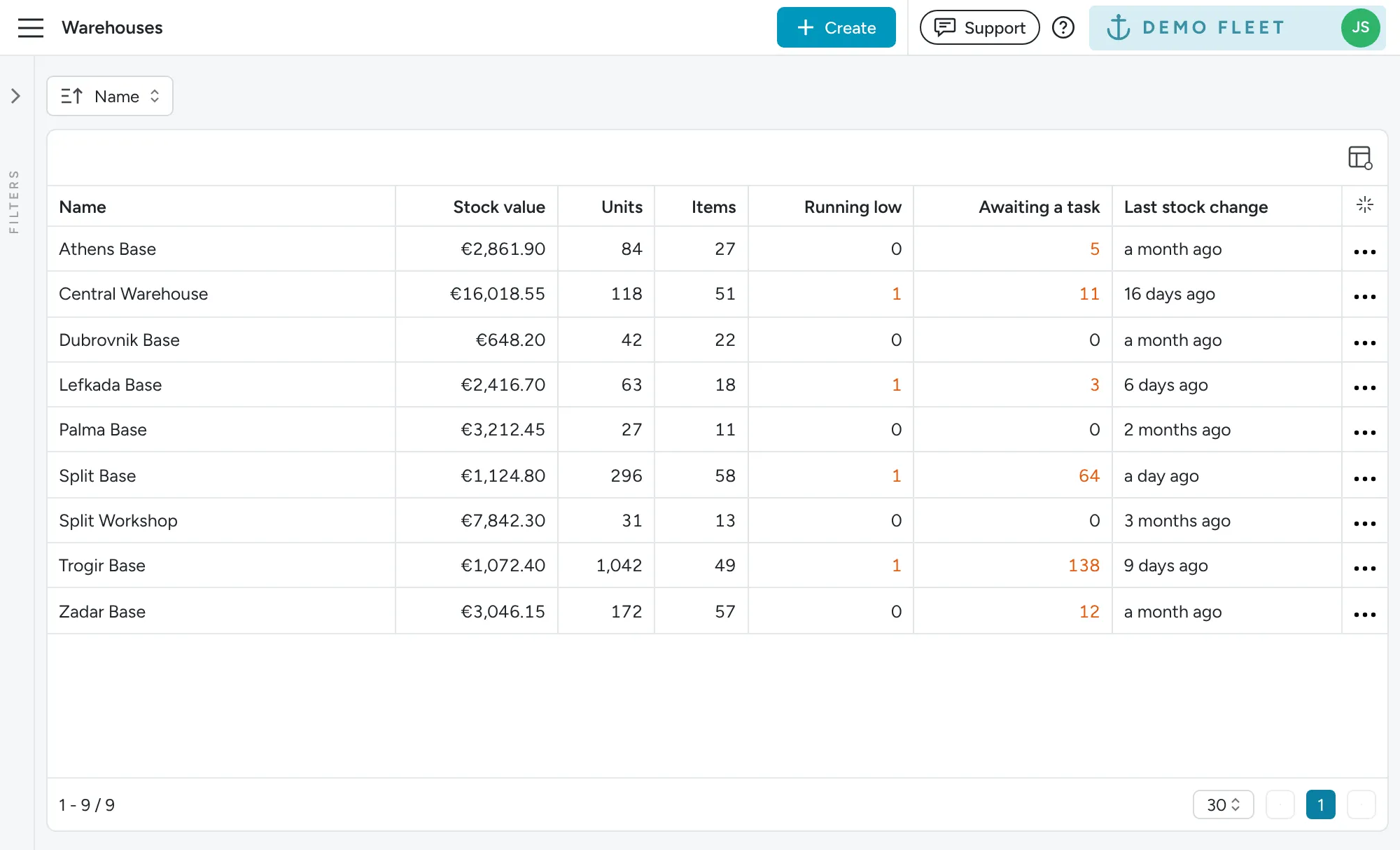
Section titled “The warehouses list”The warehouses list gives you an overview per warehouse: Stock value, Units, Items, Running low, Awaiting a task and Last stock change. Everything links through, so you can go from the overview to the detail in one click:
- Click a warehouse’s name to open the dashboard filtered to that warehouse.
- Click the Items count to open the items in that warehouse.
- Click the Running low count to open the shopping list for that warehouse.
- Click the Awaiting a task count to open that warehouse’s usage still waiting for a task.
The counts link even when they are zero. The three-dot menu on each row also opens the Open dashboard, Items, Usage and Transactions pages filtered to that warehouse.